

The Amazon Fire Stick has just undergone its most significant transformation in over five years. As of February 2026, Amazon has rolled out a completely redesigned interface, integrated the generative AI power of Alexa+, and introduced a performance-first “code rebuild” that makes older sticks feel brand new.
Whether you are using the flagship Fire TV Stick 4K Max (2nd Gen) or the new Ember Artline series, this guide will show you how to master the 2026 updates, optimize your privacy, and navigate the new anti-sideloading restrictions.
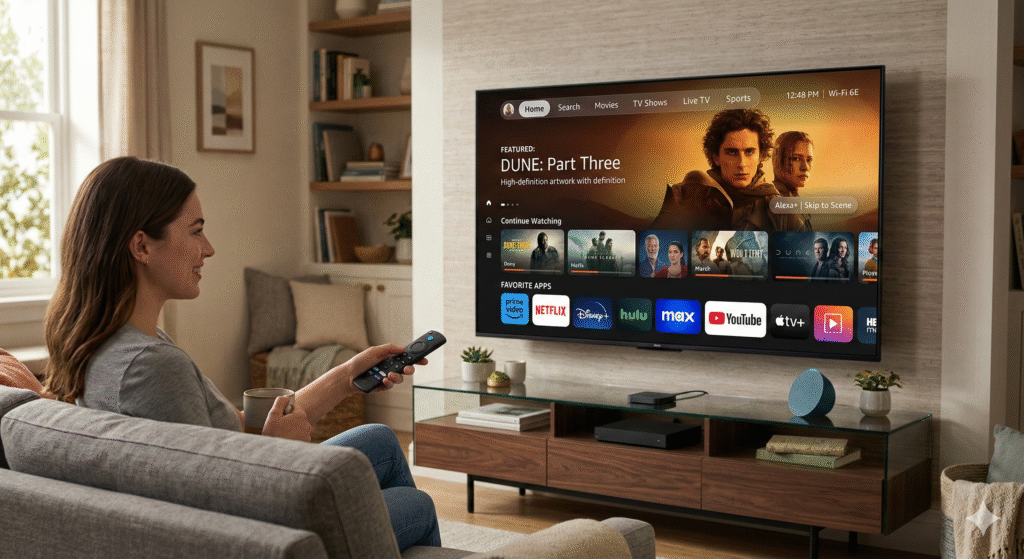
1. What’s New in the February 2026 Fire TV Update?
Amazon has officially moved away from the cluttered middle-row navigation. The new UI is cleaner, faster, and heavily influenced by the “Content-First” philosophy.
- The Top Navigation Bar: Navigation has shifted to the top of the screen (similar to Google TV). You’ll now find dedicated tabs for Home, Search, Movies, TV Shows, Sports, and Live TV.
- 20-App Pinning: You are no longer limited to 6 favorite apps. You can now pin up to 20 apps directly to your home screen for instant access.
- 30% Speed Boost: Amazon rebuilt the underlying OS code for this update. Even on older 4K Max models, navigating menus is now up to 30% snappier.
- Rounded Icons & Modern Glassmorphism: The aesthetic now features rounded corners, soft gradients, and modern typography that looks stunning on 4K QLED displays.
2. Alexa+ : Your New AI Streaming Companion
The standard Alexa is gone. In its place is Alexa+, a generative AI assistant that actually understands context.
Pro Tip: Try saying, “Alexa, show me that movie where the guy gets stuck on Mars and grows potatoes.” Instead of just a search result, Alexa+ will launch The Martian directly.
New AI Features to Try:
- Scene Jumping: You can now say, “Alexa, skip to the car chase scene,” and the Fire Stick will skip to that exact timestamp on Prime Video and select partners.
- Conversational Discovery: Ask, “What should I watch if I liked The Last of Us but want something shorter?” Alexa+ will provide a curated list with reasons why each fits your taste.
- AI Watchlist Management: Alexa+ now automatically categorizes your “My Stuff” section based on mood (e.g., “Thrillers for a Friday Night”).
3. The 2026 Hardware Lineup: Which One Should You Buy?
If you’re looking to upgrade in 2026, here is how the current models stack up:
| Model | Resolution | Storage | Key Feature |
| Fire TV Stick 4K Plus (2025) | 4K Ultra HD | 16GB | The “Sweet Spot” for value. |
| Fire TV Stick 4K Max (Gen 2) | 4K Ultra HD | 16GB | Wi-Fi 6E + Ambient Experience. |
| Fire TV Cube (3rd Gen) | 4K Ultra HD | 16GB | Fastest processor + Hands-free Alexa+. |
| Ember Artline TV | 4K QLED | N/A | Lifestyle TV with AI-generated art. |
4. Sideloading & Anti-Piracy: The 2026 Reality Check
Important SEO Update: As of February 2, 2026, Amazon has intensified its crackdown on “unlicensed content” apps.
- Installation Blocking: Unlike 2025 where apps were disabled after use, the 2026 update now blocks the installation of flagged APKs entirely. If you attempt to sideload a blacklisted app, you will see a popup: “This app has been blocked because it provides access to unlicensed content.”
- Is Sideloading Dead? No. Legitimate apps (like Kodi for local media, custom browsers, or tools from the Downloader app) still work perfectly. However, the “app cloning” loophole used to bypass blocks has been closed.
- Vega OS vs. Fire OS: Most sticks still run Fire OS (Android-based), but keep an eye on newer “Vega OS” devices, which do not support Android APKs at all.
5. Performance Checklist: 3 Settings to Change Now
To get the most out of your 2026 Fire Stick, go to Settings and adjust these:
- Stop Auto-Play Video Ads: Go to Settings > Preferences > Featured Content and turn OFF Allow Video Autoplay.
- Enable Low Latency Mode: If you use Xbox Game Pass on your Fire Stick, ensure Settings > Display & Sounds > Game Mode is set to Auto.
- Privacy Lockdown: Amazon updates often reset tracking. Go to Settings > Privacy Settings and turn OFF Device Usage Data and Interest-Based Ads.
6. FAQ: Frequently Asked Questions
How do I get the new 2026 Fire TV interface?
The update is rolling out “Over-the-Air” (OTA). Go to Settings > My Fire TV > About > Check for Updates. If your device is compatible (2021 models or newer), it will download automatically.
Does the Fire Stick 4K Max still support Wi-Fi 6E?
Yes, the 2nd Generation 4K Max supports Wi-Fi 6E, which is essential in 2026 for lag-free 4K streaming in crowded apartment complexes.
Can I still use the ‘Downloader’ app?
Yes, the Downloader app remains the best way to install utility apps not found in the official Amazon Appstore.
Conclusion
The 2026 Amazon Fire Stick is no longer just a “streaming dongle”—it is an AI-powered media hub. By mastering the new Top Navigation and leveraging Alexa+, you can spend less time searching and more time watching.